HubSpot and Capchase Integration
Last updated: May 6, 2026
Overview
Capchase integrates with HubSpot, making sales teams' lives much easier. With this integration, users can easily submit and receive eligibility results for your customers directly on HubSpot, in addition to creating Payment Links and managing their deals.
If you are interested in using this integration, please get in touch with your Capchase representative or send us a message at support@capchase.com.
How do I install the HubSpot integration?
Installing the Capchase app is very similar to installing any other HubSpot app.
Send a message to your Capchase representative requesting the integration with HubSpot.
Once your business is approved, you will receive a link from our team.
Follow the instructions on the link to install the HubSpot - Capchase integration, making sure to give Capchase the necessary permissions.
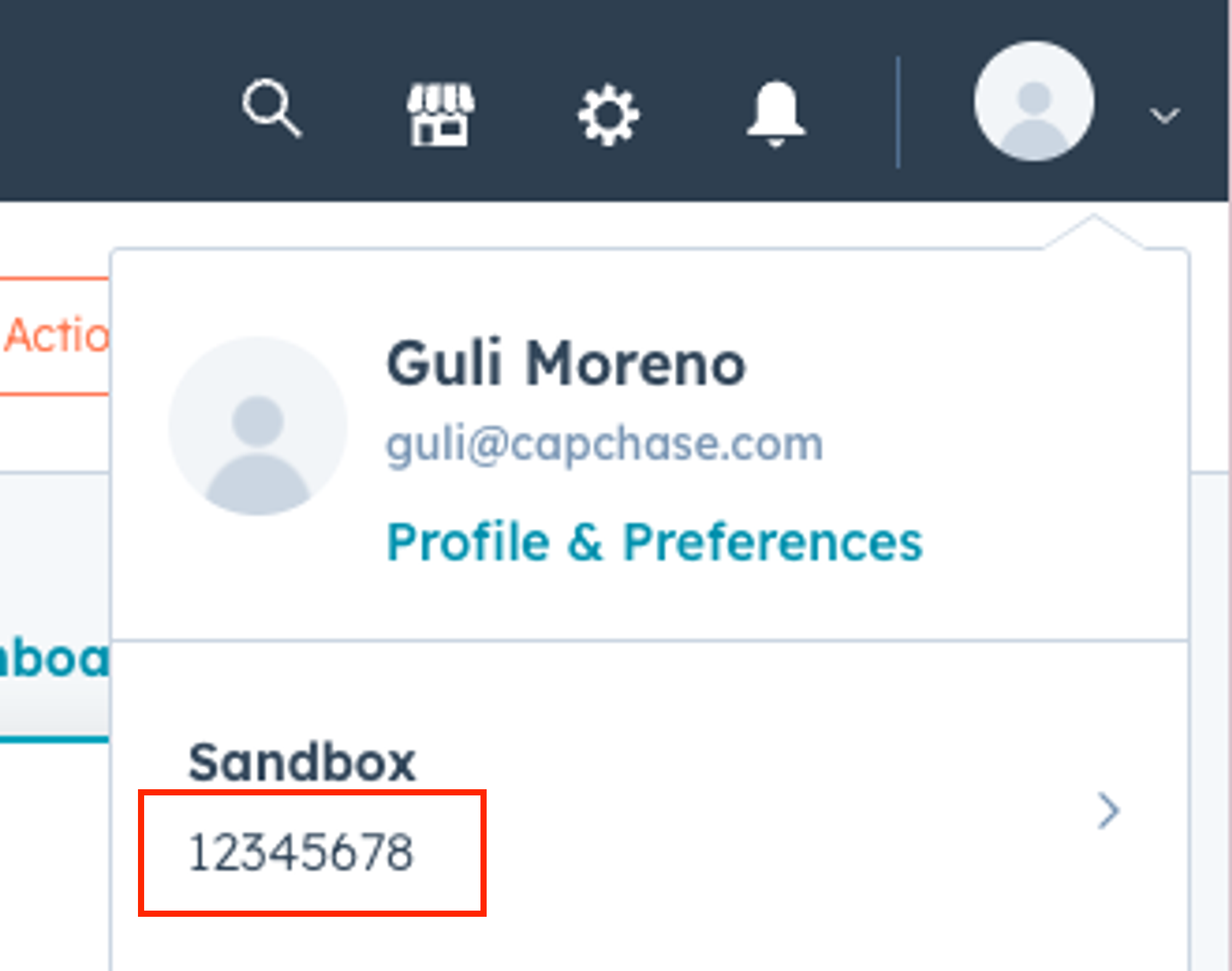
Copy the Portal ID on HubSpot and send it to your Capchase representative for activation. You can easily find it by clicking on your account in the top-right corner. It will be the number under the workspace name.
Done!
Once the installation is successfully finished, you’ll receive a confirmation message in your email:
Now that you’re done with the installation, take a look at how to create and manage your deals using HubSpot CRM in the video below:
If you have any questions or are facing any issues, don’t hesitate to send us a message at support@capchase.com or directly contact your Capchase representative.