Data submission for underwriting
Last updated: April 27, 2026
What is an underwriting?
Underwriting is an important part of the compliance and approval process for the relationship between Capchase and the Vendors. Through this process, Capchase will evaluate your business's health and determine the terms for funding your deals.
Underwriting is initially completed using the data provided in the steps below, and every 30 or 90 days (depending on your company's assessments), to renew the validity of your terms.
Having an approved underwriting is required to get new deals funded. Make sure you have all the data connected to speed up the approval of your orders.
Creating a new connection
To set up or update your banking, accounting, or subscription data connections, log into the Capchase App and follow these steps:
On the left menu, click on Settings, which will open the Data Connections tab
Click on the “+Add new” button on the data connection you want to update
Click on “Connect Now” and select your provider
Follow the instructions to share and give permission to Capchase to access your data
Removing a connection
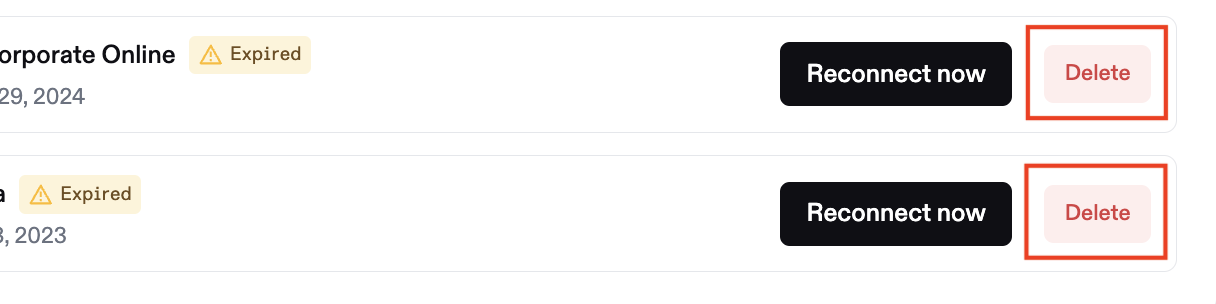
If you’d like to remove an active connection, click the 'Delete' button, confirm the action, and then follow the steps above to start over.
Fixing data connections
If you have data connections enabled, you might encounter a couple of common errors that are easy to fix.
Data connection has expired
If your data connection has expired, you will receive a notification that the integration has expired.
To reconnect, simply log in to the Capchase platform at app.capchase.com, go to Settings → Data, identify the expired or lost connection, and click 'Reconnect Now'.
A data connection may expire if your bank account has two-factor authentication enabled or if local regulations require it. Connection expirations are typically determined by the security parameters of the connected bank, which may require users to re-authenticate.
Data connection has failed
If your data connection is failing or reporting an error, it is likely related to multi-factor or 2-factor authentication (i.e. MFA or 2FA) settings on your bank account. It may also be because the financial institution you are trying to connect to is not supported by one of our open banking providers (Plaid, Teller, etc.).
Unfortunately, if MFA is enabled on your bank account, you may not be able to link it to Capchase via a data connection. You will need to upload manual data files instead.
To learn how to do this, we recommend you visit the following article: How can I upload manual data files?
If you have any questions, don't hesitate to send us a message at support@capchase.com.