Troubleshooting Payment Link Issues
Last updated: May 8, 2026
If you're experiencing issues with your Capchase payment link, here are the most common problems and their solutions:
Payment Link Won't Load or Shows an Error Message
If you see an error message like "Payment details could not be fetched" or the link won't load properly:
Try using an incognito/private browser window - This resolves most loading issues
Clear your browser cache and cookies
Contact support if the issue persists - we may need to regenerate your payment link
Bank Account Connection Issues
If you're having trouble connecting your bank account through Plaid:
Add your bank details manually instead of using the automatic connection
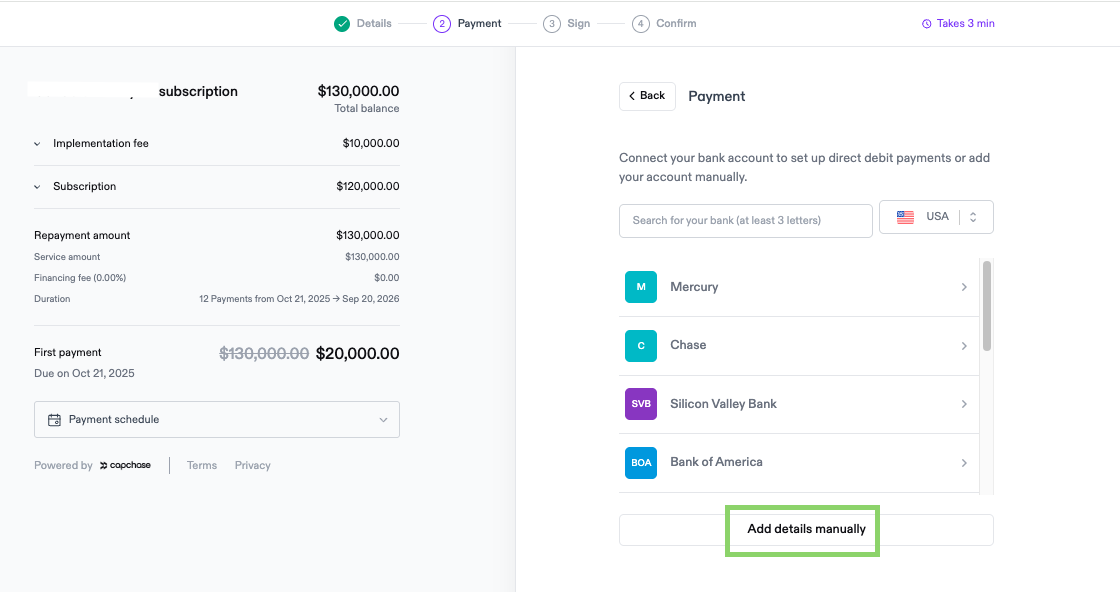
Check if your bank is supported - Some credit unions and smaller banks may not be compatible with Plaid
Try using a different bank account if available
Bank Connection Verification Code Issues
If you're asked for a verification code during the payment process:
This code comes from your bank, not Capchase - it's part of your bank's security process when connecting through Plaid
Use a direct phone number that can receive text messages
If using a business line that can't receive texts, try using a personal mobile number temporarily
DocuSign signature doesn't work
Ensure the phone number added is correctly added
If the page doesn't load, try opening it in an incognito window
Asking for Help
Contact Capchase if the payment link continues to show errors after trying the above solutions or if you need the payment method updated or the link reconfigured.
You can reach out to us at support@capchase.com.